FinFree
An Articulate 360 eLearning Course helping Small Business Owners create a budget.

INTRODUCTION
Market trends suggests that the group of small business owners are growing worldwide. However, their success is usually hindered due to a lack of knowledge in certain areas when starting to run a business. One of the biggest challenges small business owners face is understanding how to draw up a successful, yet simple budget for their new financial venture.
Problem & Solution
The Problem:
New small business owners struggle to find adequate resources that are free, credible and concise to help them with the budgeting aspect of their new business venture. The information out on the internet is vast, and can quickly lead to cognitive overload and small business owners being overwhelmed.
The solution?
An eLearning course that can address the steps to creating a business budget for Small Business owners with the guidance of a mentor and activity prompts.
MY PROCESS
STEP 1: understand what the biggest struggles are with creating a business budget and checking in with an SME.
STEP 2: Outlining the specific steps the participant would have to take in the course to successfully create a business budget. This part is usually done with Action Mapping techniques.
STEP 3: Creating short text story board to help showcase my concept of the product that I presented to the SMEs again and after their approval and encouragement, I set to work on...
STEP 4: Creating the visual low fidelity wireframes on Figma, completing my storyboard and then compiling the full list of assessments and tasks for the course.
STEP 5: Developing an interactive prototype in Articulate 360, and testing it out on some users.
Full Process & Design Documentation
Analyzing & Defining The Problem:
New small business owners struggle to find adequate resources that are free, credible and concise to help them with thebudgeting aspect of their new venture. Mentors are few, and financial planners with specialized knowledge in small business operations are few. Small Business owners have little information about how to be guided and prompted correctly to design a business budget.
Creating User Personas
Originally my idea was to create tasks for them to do and use a downloadabe worksheet to practice with and build out their budget. However, when trying to create my user personas and doing desk research, I realized that there can be many constraints for new small business owners, and keeping this in mind, I created the UX persona for my project, Alice! Alice helped me keep the user in mind and their core needs, and eventually she made me shift perspective and make better instructional design decisions. I created my UX persona in Figma.

Deciding on the Best Learning Practices & Approach:
Using the user persona created with the research about the current struggles of current small business owners, Action Mapping together with an adjusted Iteration of ADDIE was used to create a unique approach making sure to really delve into proper design thinking and making sure that the learner is being taken into account as much as possible while encouraging business metrics.
Researching Topic Lessons for the Course and its Content
As this project is my flagship project, I wanted to ensure that my course was as informative and correct as possible, so I held a meeting with an acquaintance with a masters in business finance and management, as well as consulting online sources mentioned below to help decide on budgeting content, knowledge and help formulate with which practice activities would be best. My resources were among the following:
-
https://www.businessnewsdaily.com/8323-small-business-budget.html
-
https://herbusiness.com/learn-item/small-business-finance-course/
-
https://www.thebalancesmb.com/how-to-set-up-an-emergency-fund-for-your-small-business-5072906
Action Mapping
I created the following action map with my SME, as mentioned above, in helping identify actions in which it would be best to get a small business owner to developing a budget. The Action Map helped to identify the key learning objectives as well for the course. The Action map was created in FigJam.

Brainstorming Scenes & Scenarios
I wanted the small business owner to feel like they were being coached in their own home, having someone who could comfortably join them in their home office space and mentor and guide them through the creation of their budget. Here I decided to go with the character, Lisa, who would be working together with the small business owner to help them through the various steps, be a source of extra information, and help them in a risk-free way to make mistakes and explore the concepts learned in the course.
Text-based Storyboard of 1 Scene
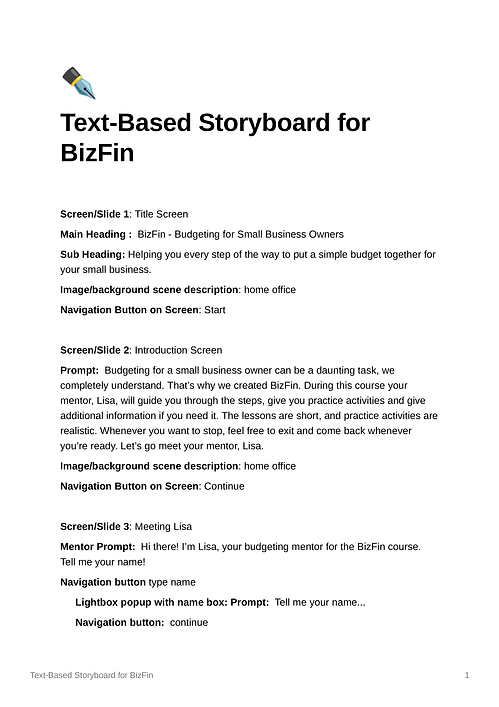
I worked with the SME to develop a realistic approach to how the first lesson of calculating the incomes would go in a scenario where the character Lisa would be the guiding mentor. The text-based storyboarding is important as it helps shows any flaws in how one can approach a situation or any misunderstandings of the terms being used or how it’s being used. This is prior to beginning the branding moodboard for the course and coming up with wireframing and further scene mapping. The storyboard was done in Notion and shared with the SME.

Design & Development Phase
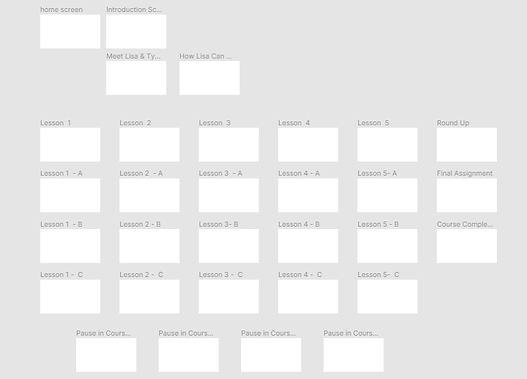
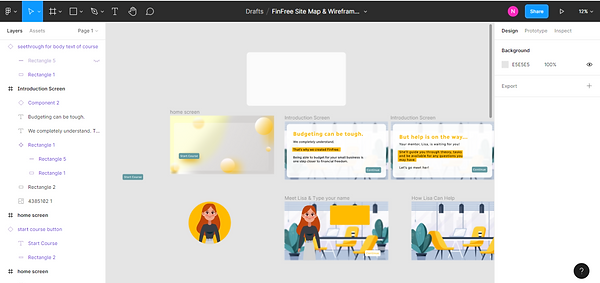
Now, the design phase of the project commenced in full swing. I did the scene mapping in Figma, some wirefraing of a few types of slides, and completed the full text storyboard. With the action map and UX Persona in hand I completed all of the abovementioned to help me remain aware of the course participant's profile. As I finished one lesson, I did the low-fidelity wireframing to make sure that the layout of the course could follow appropriate UX laws when doing my wireframes so that I would be able to save time later when it came to creating the course in storyline360.
I created the wireframes in Figma as I knew that, later down the line, I wanted some more advanced graphics that I had in mind and with the responsiveness and useful plugins of Figma, I used this over Adobe XD, as sometime I find the latter product to be a bit slower at creation. I also created the color scheme in Figma and started putting the whole moodboard for the course together.
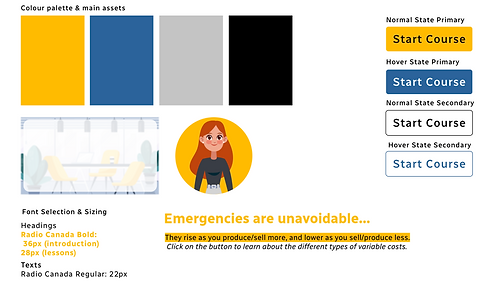
After some online branding research, reading articles on Medium.com and taking a look at various projects on Behance.net and Dribbble.com , I came up with a look and feel of the course and asked a few friends I knew if they felt any type of concern with the elements chosen. I also kept in mind best UI practices when designing of buttons and other components.
I used Adobe Illustrator, along with figma to manipulate my illustrations that I downloaded from freepik.com as vector files, and I also created the custom mentor button using Figma.
.png)
.png)
Creating the Interactive Prototype in Articulate360
I developed the first two scenes, which would be the introduction scene as well as the first budget creator lesson/scene where the participants that I planned to use in my user testing phase would have to calculate the income for their own "mock" small business. This included the opening screen, explanation of the course expectations, meeting the mentor and introducing themselves, as well as the starting lesson with the budget builder at the end of the lesson.
One of the most important things for me to keep in mind was the comfort and different learning speeds various learners have. I made sure to include prompts that encouraged rest and taking a break if needed, and made sure that the learner could access the various lessons at the start of the course again, should they leave the course and return later.
User Testing
I gathered a few friends who were willing to participate in completing the first two scenes of the course, and gave them free reign of the course. My goal was not to give them any guidance on how to complete or move through the slides, which they seemed to do just fine. I took the bits of feedback that I got from them and made a few adjustments such as:
-
Changing of animation types on certain screens to make it less conspicuous;
-
made some slight modifications to the positioning of the various navigation buttons;
-
slightly modified the colour palattte blue to a darker shade;
-
adjusted states of buttons for visual clarity;
-
Created a full budget view and a screen with a certificate to let the participants know that they've reached the end stage.
REFLECTIONS
Adjusting Processes: I've found that while certain processes like ADDIE may be followed perfectly in ideal situations, the reality is that sometimes it can take a mixture of various learning approaches. At times, it means modifying them a bit to suit the needs of both the business as well as the learner and to make sure that the course's objectives are met in a practical, realistic and actionable manner. I don't think I've ever been able to perfectly execute a learning approach without real-life circumstances getting in the way, and that's the beauty of being able to work in an iterative, flexible manner to still drive your course's content and objectives home.
Visual Assets: It's always a good idea to learn various image editing tricks and tools of the trade for various reasons. For this project, I had to do basically everything by myself, which ment adjusting graphics I'd found online at freepik.com to try and make them fit to my course and different scenes. I used a mixture of both Adobe Illustrator and Figma in this case, because I find that in Illustrator, it's best to do more complex work, but Figma is powerful enough for a lot of smaller changes and does so quickly.
Softwares Used: I managed to use quite the variety of sowftware for this project, such as Notion, Figma, various plugins, FigJam, Adobe Illustrator, Storyline 360 and also challenged me to use the animations I had available within the programs to make it seem more personal than just any boring old course with simple fade in and fade out animations. The best was also learning about xAPI as I've been really interested in learning more about it.
Improvements: In future, I want to develop more courses using more xAPI statements and tracking in order to better understand how learners are progressing through the course and seeing exactly where the improvements can be made to help learners progress quicker and more successfully.
Learner Experience Design: The LXD remains the main point of focus for me and helps keep me on track with who I'm actually deigning for and gives me a more realistic view of the user of the course. The fact that I aim to create experiences based around the user's needs along with Learning Theories and Action Mapping really helped me to clearly visualize where I wanted to go with the course, and if it hadn't been for that, I'd probably be doing another information-dumping course with no actionable tasks and practices, resulting in just another e-Learning course lost in a sea of polished powerpoint slides.